Multi-Target Testing
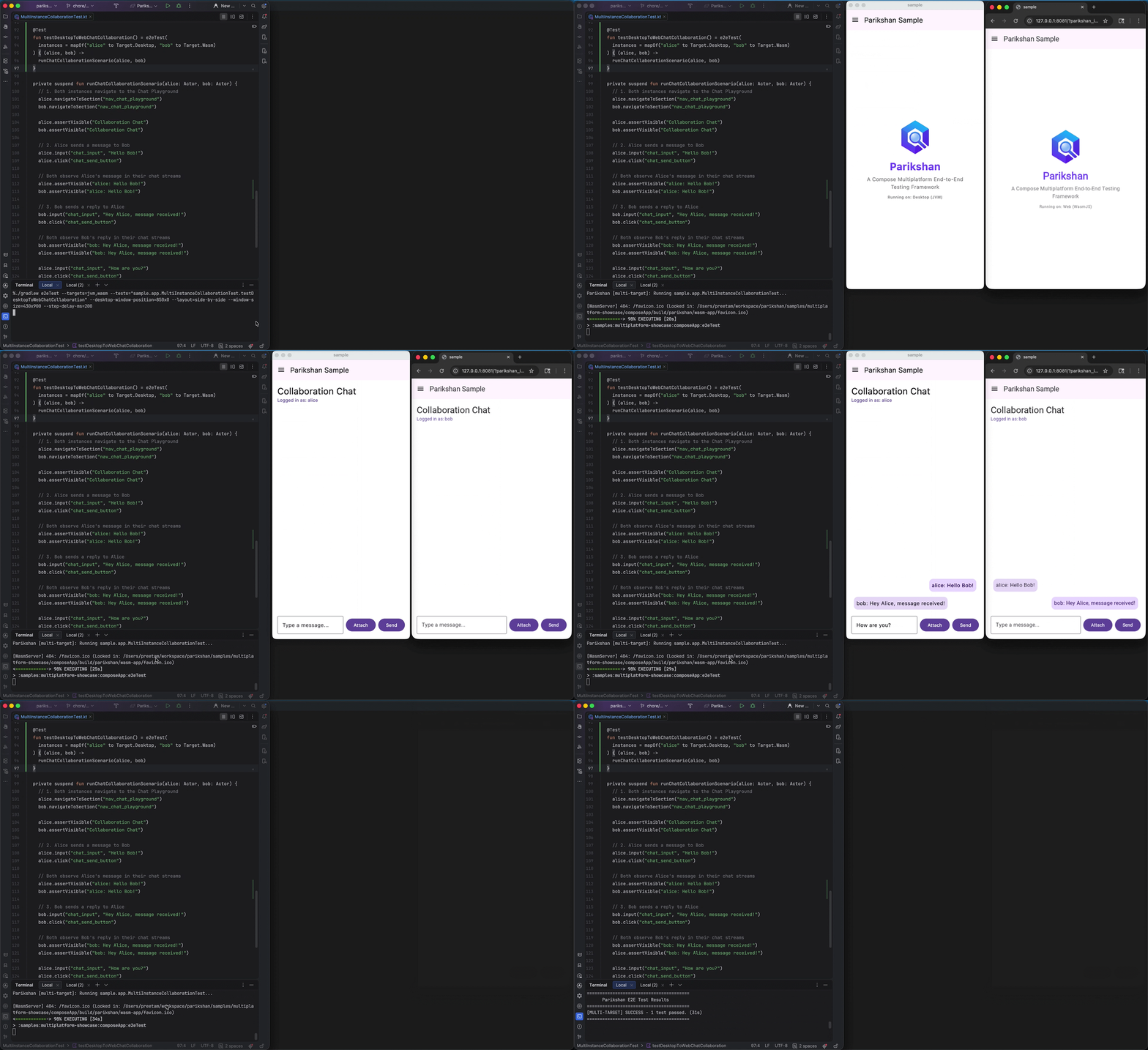
Multi-target testing drives actors running on different platform targets inside one test scenario. For example, Alice can run on Desktop (JVM) while Bob runs on Web (Wasm) against the same backend.
Declaring Multi-Target Tests
Map each actor name to a Target (Target.Desktop or Target.Wasm) using instances = mapOf(...). The test block receives destructured Actor instances in map order:
@Test
fun testDesktopToWebChatCollaboration() = e2eTest(
  instances = mapOf("alice" to Target.Desktop, "bob" to Target.Wasm)
) { (alice, bob) ->
  // Alice runs on Desktop JVM, Bob runs on Web Wasm
  alice.click("nav_chat_playground")
  bob.click("nav_chat_playground")

  alice.assertVisible("Collaboration Chat")
  bob.assertVisible("Collaboration Chat")

  // Alice sends a message from Desktop
  alice.input("chat_input", "Hello from Desktop!")
  alice.click("chat_send_button")

  // Bob verifies receipt on Web
  bob.assertVisible("alice: Hello from Desktop!")

  // Bob replies from Web
  bob.input("chat_input", "Hello from Web!")
  bob.click("chat_send_button")

  // Alice verifies receipt on Desktop
  alice.assertVisible("bob: Hello from Web!")
}
Reusable Scenario Helper Pattern
To share scenario logic between same-platform multi-instance tests and cross-platform multi-target tests, move the interaction steps into a suspend helper accepting Actor parameters:
class MultiInstanceCollaborationTest {

  @Test
  fun testTwoPartyChatCollaboration() = e2eTest(listOf("alice", "bob")) { (alice, bob) ->
    runChatCollaborationScenario(alice, bob)
  }

  @Test
  fun testDesktopToWebChatCollaboration() = e2eTest(
    instances = mapOf("alice" to Target.Desktop, "bob" to Target.Wasm)
  ) { (alice, bob) ->
    runChatCollaborationScenario(alice, bob)
  }

  private suspend fun runChatCollaborationScenario(alice: Actor, bob: Actor) {
    alice.click("nav_chat_playground")
    bob.click("nav_chat_playground")

    alice.input("chat_input", "Hello Bob!")
    alice.click("chat_send_button")
    bob.assertVisible("alice: Hello Bob!")

    bob.input("chat_input", "Hey Alice, message received!")
    bob.click("chat_send_button")
    alice.assertVisible("bob: Hey Alice, message received!")
  }
}
To read actor identity inside your app code (parikshan.instance.id on Desktop, ?parikshan_instance= on Wasm), see Reading Actor Identity.
Supported Platforms (0.1.0)
| Target | Status in 0.1.0 | Behavior |
|---|---|---|
Target.Desktop |
Supported | Launches an isolated Desktop JVM process for each Desktop actor. |
Target.Wasm |
Supported | Creates a fresh Playwright BrowserContext for each Wasm actor. |
Target.Android |
Planned (0.2.0) | Fails fast with UnsupportedOperationException / GradleException if declared in instances = mapOf(...). |
Target.Ios |
Planned (0.2.0) | Fails fast with UnsupportedOperationException / GradleException if declared in instances = mapOf(...). |
Orchestration & Method Filtering
When running across multiple targets:
Parikshan coordinates execution in three steps:
- Build-Time Source Scanning: Scans
commonTestandjvmTestfiles (ignoring comments) to discover@Testmethods declaringe2eTest(instances = mapOf(...))and their actor-to-target assignments. - Method-Level Filtering: Invokes JUnit ConsoleLauncher with
--select-method <Class>#<method>for multi-target methods. If--testsmatches only multi-target method(s), redundant single-target Desktop and Wasm passes are skipped automatically. - Target Affinity Guards: If you run a single-target task (such as
./gradlew :composeApp:e2eDesktopTestore2eIosTest) on a suite containing a Desktop+Wasm test, Parikshan aborts that method withTestAbortedExceptionso JUnit reports it as skipped rather than failing the build.
Execution Command
Specify all required targets in --targets:
./gradlew :composeApp:e2eTest \
  --targets=jvm,wasm \
  --tests="sample.app.MultiInstanceCollaborationTest.testDesktopToWebChatCollaboration"
Place Desktop and Web windows side by side with a step delay for visual inspection:
./gradlew e2eTest --targets=jvm,wasm \
  --tests="sample.app.MultiInstanceCollaborationTest.testDesktopToWebChatCollaboration" \
  --desktop-window-position=850x0 \
  --layout=side-by-side \
  --window-size=430x900 \
  --step-delay-ms=200
Known Limitations (0.1.0)
- Literal Actor Maps Required: Actor-to-target mappings must be written directly inside
e2eTest(instances = mapOf("alice" to Target.Desktop, ...))so build-time source scanning can launch the right targets before JUnit starts. - Actor-Target Consistency per Run: Within a single multi-target run, an actor name must map to the same target across all selected methods. If two methods map
"alice"to different targets, Parikshan fails before launch; use distinct names ("desktopAlice","webAlice") or filter to one method with--tests. - Video Recording Skipped: Video capture is skipped during multi-target runs in
0.1.0. Single-instance video recording is unaffected. - Desktop vs. Wasm State Isolation: Desktop actors reuse their process across methods in a batch, whereas Wasm actors start with a clean
BrowserContextper test method. Reset shared backend and Desktop UI state explicitly between scenarios. - Dedicated Test Classes: Keep multi-target tests separate from single-instance
E2ETestLifecycleclasses. - Synchronized Mode (
--sync): Multi-target tests are skipped when--syncis active.