Multi-Instance Testing
Multi-instance testing runs multiple instances of your application at the same time on a single platform within one test. Use it to verify peer-to-peer messaging, collaborative editing, inventory contention, and multi-role workflows.
Declaring Multi-Instance Tests
Pass actor names directly to e2eTest. The test lambda receives an E2EMultiInstanceScope, which supports Kotlin destructuring for up to 5 actors:
@Test
fun testTwoPartyChatCollaboration() = e2eTest("alice", "bob") { (alice, bob) ->
  // 1. Both instances open the chat screen
  alice.click("nav_chat_playground")
  bob.click("nav_chat_playground")

  alice.assertVisible("Collaboration Chat")
  bob.assertVisible("Collaboration Chat")

  // 2. Alice sends a message
  alice.input("chat_input", "Hello Bob!")
  alice.click("chat_send_button")

  // 3. Both observe Alice's message
  alice.assertVisible("alice: Hello Bob!")
  bob.assertVisible("alice: Hello Bob!")

  // 4. Bob replies
  bob.input("chat_input", "Hey Alice, message received!")
  bob.click("chat_send_button")

  // 5. Both observe Bob's reply
  bob.assertVisible("bob: Hey Alice, message received!")
  alice.assertVisible("bob: Hey Alice, message received!")
}
You can also pass a list directly (e2eTest(listOf("alice", "bob")) { (alice, bob) -> ... }).
Visual Demos
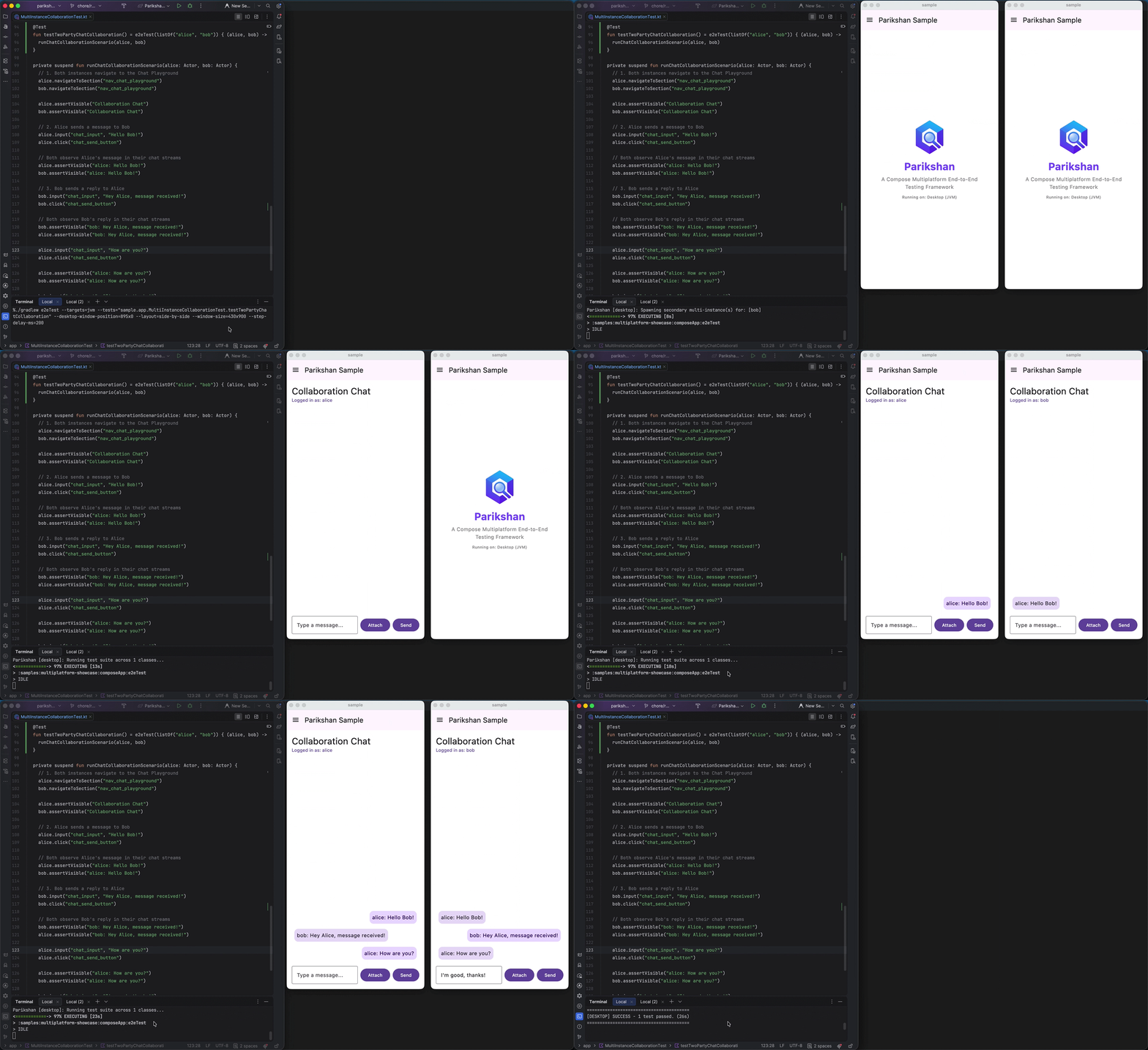
Two-User Chat (Desktop + Desktop)
./gradlew e2eTest --targets=jvm \
  --tests="sample.app.MultiInstanceCollaborationTest.testTwoPartyChatCollaboration" \
  --desktop-window-position=895x0 \
  --layout=side-by-side \
  --window-size=430x900 \
  --step-delay-ms=200
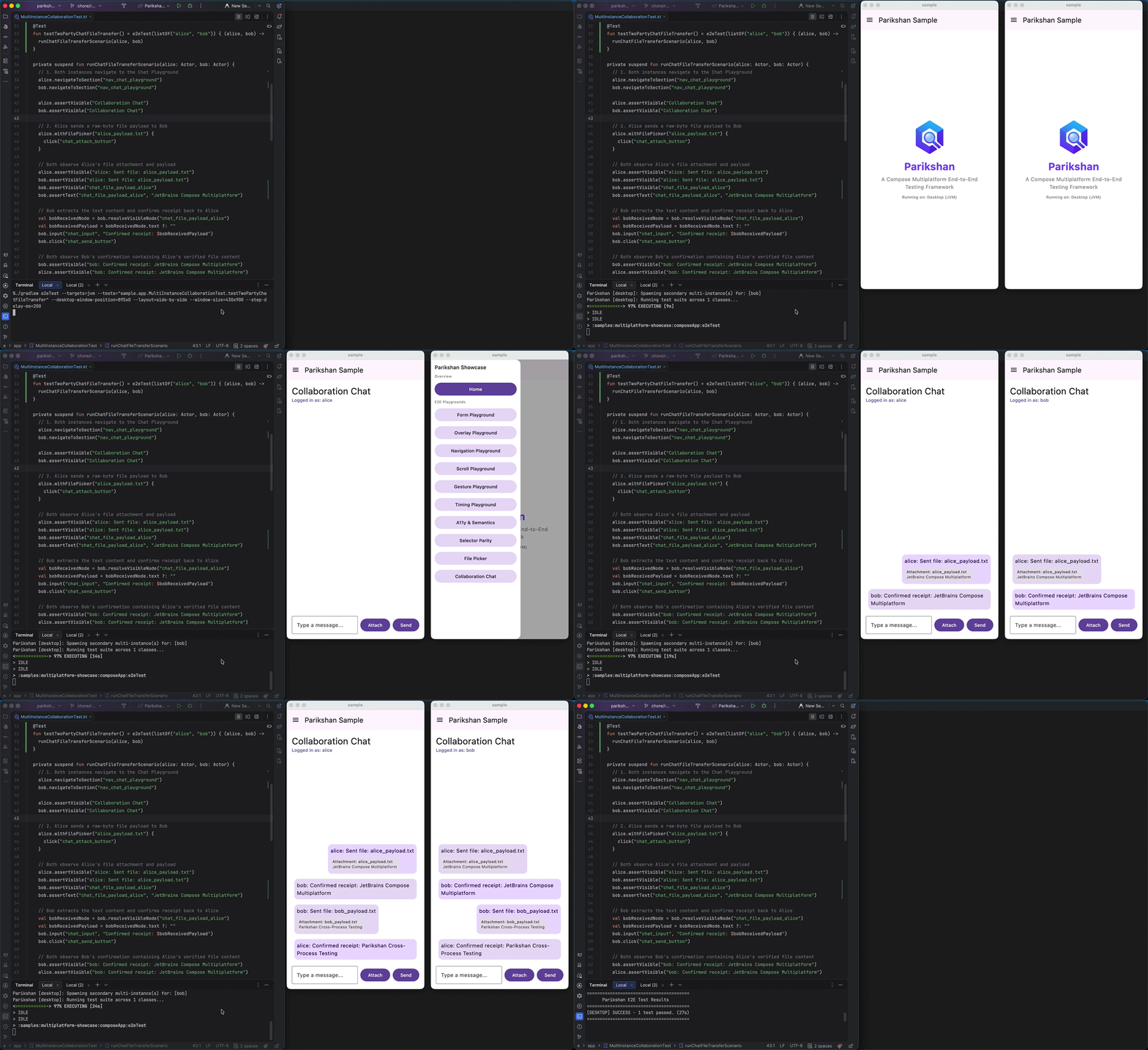
Two-User Chat with File Upload (Desktop + Desktop)
./gradlew e2eTest --targets=jvm \
  --tests="sample.app.MultiInstanceCollaborationTest.testTwoPartyChatFileTransfer" \
  --desktop-window-position=895x0 \
  --layout=side-by-side \
  --window-size=430x900 \
  --step-delay-ms=200
Actor Identifiers & Indexing
Each actor is an Actor (a typealias for E2ETestScope). Actor identifiers must match ^[a-zA-Z0-9_-]+$ (letters, digits, hyphens, and underscores only). If you have more than 5 actors or prefer named access, index the scope directly:
e2eTest(listOf("alice", "bob", "charlie")) { scope ->
  val alice = scope["alice"]
  val bob = scope.instance("bob")
  val charlie = scope["charlie"]

  alice.click("action")
  bob.assertVisible("status")
  charlie.assertVisible("status")
}
Parallel Actor Actions (inParallel)
When actors do not need strict step-by-step ordering (for example, navigating or filling forms concurrently), use inParallel:
e2eTest(listOf("alice", "bob")) { scope ->
  scope.inParallel {
    click("nav_chat_playground")
    assertVisible("Collaboration Chat")
  }

  scope.inParallel(
    "alice" to { input("chat_input", "Hi from Alice") },
    "bob" to { input("chat_input", "Hi from Bob") }
  )
}
Reading Actor Identity in Your App
If your application needs to distinguish which actor instance is running (for example, to label a sender or isolate local storage):
| Target | How to read actor identity | Isolated data directory |
|---|---|---|
| Desktop (JVM) | System.getProperty("parikshan.instance.id") |
System.getProperty("parikshan.data.dir") (build/parikshan/<target>/data/<actor>) |
| Web (Wasm) | URL query parameter ?parikshan_instance=<actor> |
Isolated per Playwright BrowserContext (localStorage, sessionStorage, cookies) |
Setup & Teardown
In 0.1.0, E2ETestLifecycle (beforeEach / afterEach) applies only to single-instance e2eTest { ... }. For multi-instance tests:
- Use standard
kotlin.test.@BeforeTestand@AfterTestfor non-UI resets (backend fixtures, temp files, database state). - Wrap repeated UI setup/teardown across actors in a
suspendhelper withtry { ... } finally { ... }:
private suspend fun withSignedInActors(
  alice: Actor,
  bob: Actor,
  block: suspend () -> Unit
) {
  alice.click("nav_chat_playground")
  bob.click("nav_chat_playground")
  try {
    block()
  } finally {
    // optional UI cleanup
  }
}
Supported Platforms (0.1.0)
| Target | Status in 0.1.0 | Behavior |
|---|---|---|
| Desktop (JVM) | Supported | Launches one JVM process per actor with an ephemeral port and separate data directory. |
| Web (Wasm) | Supported | Creates a fresh Playwright BrowserContext per actor per test with separate storage and cookies. |
| Android | Planned (0.2.0) | e2eTest(listOf(...)) in commonTest is skipped via TestAbortedException during e2eAndroidTest. |
| iOS | Planned (0.2.0) | e2eTest(listOf(...)) in commonTest is skipped via TestAbortedException during e2eIosTest. |
Platform Execution Models
Desktop (JVM)
On Desktop, Parikshan launches an independent JVM process for each actor:
- Port Isolation: Each process allocates an ephemeral HTTP port and writes its descriptor to
build/parikshan/<target>/sessions/<actor>.json. - Window Tiling: Desktop windows tile automatically from
(50, 50)or from your--desktop-window-position=X,Y/--layout=side-by-sideorigin. - Just-In-Time (JIT) Secondary Windows (
e2eTest): When running./gradlew e2eTest --targets=desktop, single-instance classes run first with only the primary window open. Secondary windows launch immediately before multi-instance classes execute and close afterward. - State Reuse Across Methods: Desktop processes stay running between test methods in a class. Reset app and backend state explicitly at the start or end of each test.
Web (Wasm)
On Web (Wasm), actors share the local Wasm server while staying isolated in the browser:
- Browser Context Isolation: Each actor gets a fresh Playwright
BrowserContext(browser.newContext()) per test method, isolating cookies,localStorage, andsessionStorage. - Serialized Playwright Dispatch: All browser commands run on a single Playwright dispatch thread so
inParallel { ... }blocks across Wasm actors remain thread-safe.
Executing Multi-Instance Tests
Both e2eDesktopTest and e2eJvmTest support --tests filtering on projects using jvm() or jvm("desktop"):
Known Limitations (0.1.0)
- Literal Actor Names Required: Gradle discovers actor names by scanning
commonTestandjvmTestsource files at build time. Pass string literals directly toe2eTest(listOf("alice", "bob"))ore2eTest("alice", "bob"); variables or dynamically constructed lists are not discovered in0.1.0. - Video Recording Skipped: Video capture is skipped during multi-instance and multi-target runs in
0.1.0. Single-instance video recording is unaffected. - Dedicated Test Classes: Place multi-instance tests in their own test classes separate from single-instance
E2ETestLifecycleclasses. - Standalone
e2eDesktopTestBoot Scope:e2eDesktopTestboots all discovered Desktop actors in the module before filtering--tests. Usee2eTest --targets=desktop --tests="..."if you want JIT window scoping per class. - Desktop
relaunchApp(): CallingrelaunchApp()on a multi-instance Desktop actor throwsUnsupportedOperationExceptionin0.1.0. - Synchronized Mode (
--sync): Multi-instance tests are skipped when--syncis active.