E2E Testing for Compose Multiplatform
Parikshan is an E2E testing framework for Compose Multiplatform - Write a test in Kotlin, run it on Android, iOS, Desktop, and Wasm — watch it execute on each target.
I built this because testing CMP applications across all targets has been consistently the hardest part of shipping multiplatform code.
The Testing Gap
Compose Multiplatform lets you share UI code across Android, iOS, Desktop, and Wasm. But when it comes to verifying that UI, each platform has its own testing framework, its own language, and its own setup overhead.
On Android, Compose testing APIs work but require DI, ViewModels, and mock layers before you can verify a simple button click. iOS needs XCTest written in Swift. Desktop has no established testing framework for Compose. Wasm renders to a <canvas> element — no DOM, no elements to inspect, and no testing tool available for it at all.
I wanted something different. Write a test in Kotlin. Run it on every target. See the UI while it runs. No test-specific code in the main application.
Existing Tools
- Maestro - covers Android and iOS but tests are in YAML, with no Desktop or Wasm support.
- Cypress - web-focused and can't inspect Wasm canvas content.
- Detox - works well for React Native but is JavaScript-only & limited to iOS, Android.
- Appium has broad platform coverage but complex setup and slow execution.
None of these cover all four CMP targets with a single test language.
What I Set Out to Build
- Write tests in Kotlin only
- simple commands like
click,input,assertVisible- No Compose test APIs required - One plugin dependency, everything works out of the box
- No test-specific code in the main application — the framework handles all wiring
- All CMP targets supported, including Wasm
- Visual feedback — see tests running on real target windows
- Video recording at test, class, and suite level granularity
- Screenshot capture
- Layout resizing — test a mobile layout by resizing the desktop window, no emulator needed
- Window positioning — place Desktop and Web windows side by side for demos
- Synchronized execution — all targets running the same test step at the same time
- Watch mode — automatic re-execution on file save without restarting Gradle
- Multi-instance testing — launch and interact with two windows of the same application
- Multi-target testing — a Desktop and a Wasm instance communicating through the test
- IDE plugin for IntelliJ and Android Studio
Parikshan
A test looks like this:
class SampleE2ETest {
  @Test
  fun testGreeting() = e2eTest {
    input("name_input", "Parikshan")
    click("greet_button")
    assertVisible("Hello, Parikshan!")
  }
}
This test lives in commonTest. The same code runs on Android, iOS Simulator, Desktop, and Wasm without modification.
# All configured targets, concurrently
# OR specify using --targets=jvm,ios
./gradlew e2eTest

# Specific targets
./gradlew e2eDesktopTest
./gradlew e2eAndroidTest
./gradlew e2eIosTest
./gradlew e2eWasmTest
Setup is one plugin in your build.gradle.kts. For detailed setup instructions, see the Installation page.
No test-specific code in your main application. No custom wrappers or special tags beyond the standard Modifier.testTag(). The Gradle plugin handles embedding the test server in debug builds, configuring platform drivers, managing simulator and emulator lifecycle, and cleaning up after execution.
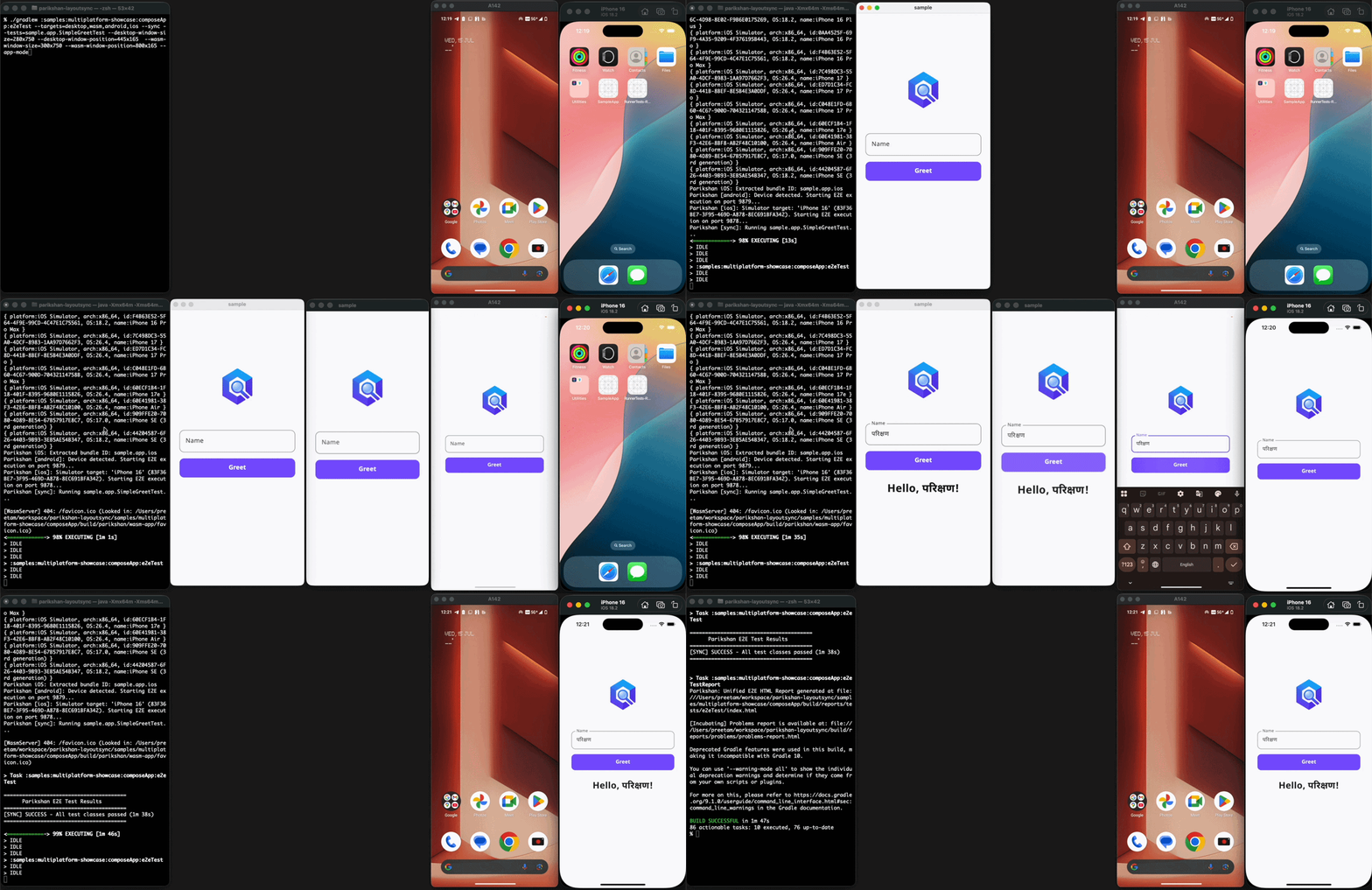
All targets running the same test in synchronized execution mode.
Each target uses a different communication path — embedded HTTP/WebSocket server for Desktop and iOS, Playwright JS bridge for Wasm, Compose testing APIs with UiAutomator for Android. Production builds never include the test server or any Parikshan dependencies. The Architecture & Security page covers the full design.
What Was Hard
- Wasm renders to a canvas with no DOM. There are no elements to query from outside the browser page. Getting selector resolution to work required building a JS bridge through Playwright that communicates with the Compose Semantics Tree inside the canvas.
- iOS and Wasm initially required test server bootstrap code inside the main application. I replaced this with build-time source instrumentation — the Gradle plugin copies entry points to an isolated build directory, instruments them, and compiles only during test execution. Source files on disk stay untouched.
- Material 3 components like date pickers, time pickers, and dropdown menus render differently across targets. A gesture that works on Android needs different coordinates on Desktop and a different interaction model on Wasm. Stabilizing these took months of testing against real application screens.
I've been using Parikshan in my own projects since the beginning.
Where It Is Now
Parikshan works for standard E2E workflows — forms, buttons, navigation, scrolling, overlays, drag gestures, and complex Material 3 component interactions including date and time pickers.
Layout resizing, window positioning, synchronized execution, and watch mode are implemented and being stabilized for public release. Multi-instance testing, multi-target testing, and an IDE plugin are planned. The Roadmap tracks the full list.
Try It
Follow the Your First Test guide to set up and run your first E2E test.
For working sample applications with video demos across all targets, see the Examples page.
More Info:
- Documentation: aryapreetam.github.io/parikshan
- API Reference: aryapreetam.github.io/parikshan/api
- GitHub: github.com/aryapreetam/parikshan
If you're working with Compose Multiplatform, I'd appreciate feedback — what works, what breaks, what's missing. Open an issue or start a discussion on GitHub.